GitHub Actions trigger on pull-request's base changes
Update Mar 3, 2024: Did GitHub add a built-in solution for this issue? (learn more)
GitHub Actions is super useful for the average developer. But, I’ve got a not-so-niche issue to explore:
How do you get GitHub Actions to trigger CI workflows for existing pull-requests when the base branch has new commits?
Note to self: base is the target branch that head, the pull-request, is merging into. Terminology is important. If you see phrasing that feels clunky, it is in an effort to stick with the correct terminology.
There’s this issue of drift within test pipeline that’s doing my head in. I can have pull-requests with successful CI pipeline tests, but because the base branch has drifted ahead (i.e. commits have been pushed to it) my tests are worthless.
The problem
Fri  4.17pm - !feat: amazing new feature
Fri 11.10pm - hotfix: merge conflicts
Has this ever happened to you?
- A new PR is created for
feature-branch->main. - CI is triggered & runs jobs for lint, test, etc.
- CI passes, PR is reading green status checks across the board.
- New commits are pushed to
mainthat will conflict withfeature-branch. - Developer reviews PR, sees successful status checks, & merges PR.
- CI is triggered by PR’s push into
mainbut fails! - Frantic hotfix PR 🩹
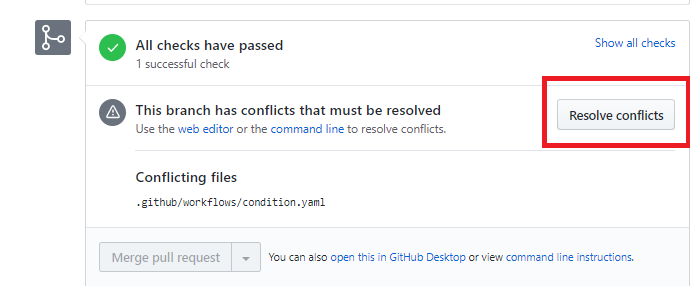
Some of you in the audience are thinking, “GitHub will prevent a PR merge if conflicts are present” (see pic below), and you are correct! The merge conflicts that developers are most common with are those where “competing changes are made to the same line of a file, or when one person edits a file and another deletes the same file” (GitHub Docs).
However, there are other kinds of merge conflicts that are common but detected differently. These are, for example, conflicts between database migration files, or an API server & client. They are detectable via tests & that’s why we have CI pipelines. These tests need to be run on the merge-commit so, as much as I love to use them, pre-commit hooks won’t work - it has to be CI.
I’ll explain in detail an example of this type of merge conflict in the next but if all you care about is GitHub Action triggers, then by all means skip along.
Database Migration Merge Conflicts
Database migration files describe changes to your database schema; e.g. add a new table, edit a column datatype, delete a database role, etc. These changes are bundled into sequentially numbered/ordered files to allow for rolling forward & back changes safely.
Database ORMs & migration tools often include a dependency to the previous migration file when creating new ones as a means to maintain the order. For example, Django & its makemigrations CLI tool (docs) generate numbered migrations files that are dependent on the previous migration file:
migrations/
  0001_initial.py
  0002_add_author_field.py
# 0002_add_author_field.py
from django.db import migrations, models
class Migration(migrations.Migration):
dependencies = [("migrations", "0001_initial")] # The dependency!
operations = [
migrations.DeleteModel("Tribble"),
migrations.AddField("Author", "rating", models.IntegerField(default=0)),
]Database migration merge conflicts take different forms. Imagine two developers working in isolation within their own feature branches. They both make database changes to the same schema entities; such as, both developers removing the same column. Merging those branches would then include two different migration files with two attempts to remove the same column. Conflict.
Mileage may vary across ORMs. Django is sensitive; it will complain when two or more migration files share the same dependency regardless of content as a preventative measure.
# 0003_add_feature_A.py, 0003_add_feature_B.py
from django.db import migrations, models


class Migration(migrations.Migration):
    dependencies = [("migrations", "0002_add_author_field")]
    # Identical in both files!
$ python manage.py makemigrations --check
CommandError: Conflicting migrations detected; multiple leaf nodes in the migration graph: (0003_add_feature_A, 0003_add_feature_B in migrations).
To fix them run 'python manage.py makemigrations --merge'
Let’s digress for a moment & I’ll briefly mention an alternative approach. Someone on HackerNews (I neglected to keep a reference) described how his team does not generate nor commit migration files during development cycles. Instead, developers are expected to generate them as needed. I don’t like this. I can’t imagine how you’d easily persist data across local/test databases without purging/repopulating them after each commit. If this is an attempt to minimize the number of migration files, I’d rather consolidate them between development and/or releases cycles.
Catching these Conflicts with GitHub Actions
Sticking with our Django example, we could detect these conflicting migrations by running a check on the merge-commit using GitHub Actions:
name: Simplified Django Migration Check

on:
  pull_request:

jobs:
  test:
    runs-on: ubuntu-latest
    ...
    steps:
      - uses: actions/checkout@v4
      - uses: actions/setup-python@v5
      ...
      - run: pip install -r requirements.txt
      - name: Check for missing or conflicted migration changes
        run: |
          python manage.py makemigrations --check --dry-run
          if [ $? -ne 0 ]; then echo "Error missing migration changes."; echo $?; fi;
makemigrations --check will do two things:
- Raise an error if there is conflicting migrations detected.
- Exit with a non-zero status code if there are database changes that were not reflected in the database migration files.
Triggers
GitHub Action workflows can be triggered in a number of poorly documented ways; see docs.
Let me start by warning against using push triggers for feature branches. Writing workflows will inevitably use actions/checkout to fetch the repository’s code. It performs a git checkout based on the github.ref environment variable. A push-based workflow’s ref is the refs/head/branch_name - the latest commit on the head branch. Thus, you’re not testing against the merge commit of head & base. To make matters worse, GitHub will automatically take these workflows & use them as the status checks for any related pull-requests. As such, these triggers should only be used for your main development & release branches; e.g. on: push: [main, development].
The pull_request trigger has a ref like refs/remotes/pull/##/merge, the desired merge-commit of the head & base branches (docs) (blog). Furthermore, workflows will not run if merge conflicts exist between the code of the two branches. Great! But, it only triggers when there is pushes to the head branch (docs). Pushes to base will not trigger, nor invalidate the pull-request’s status checks.
Trigger on Push to Base Branch
Here’s what we can do: on a push: main, trigger a job that uses the GitHub API to find pull-requests with a main base branch & rerun their workflow runs. Why rerun? Because that maintains the link between the CI run & the pull-request’s status checks.
To make life easier, we can use the GitHub CLI tool gh which is available by default from the GitHub Actions Runner Image. It does require some additional permissions but you’ll notice them in the examples.
I’m also going to separate this new logic into its own bash script. I dislike writing large bash code within a GitHub Action workflow yaml - it lacks bash lint support & sometimes the GitHub Action syntax can cause unexpected behaviour. There’s also the benefit of a standalone bash script that can be run without GitHub Actions.
Oh, I forgot to mention a workflow run’s status. There’s a slew of states listed in the API docs. It would make sense that we wouldn’t care for the outcome of workflows currently in progress, seeing as the base has changed. So, we could cancel those workflows & rerun them. We wouldn’t need to cancel runs that have yet to start; i.e. queued, requested, etc.
# .github/workflows/ci.yml
on:
  push:
    branches: [ main ]
  pull_request:
  workflow_dispatch:

concurrency:
  group: ${{ github.workflow }}-${{ github.head_ref || github.run_id }}
  cancel-in-progress: ${{ github.event_name == 'pull_request' }}

jobs:
  retrigger_pull_requests_workflows:
    if: github.event_name == 'push' && github.ref_name == 'main'
    uses: ./.github/workflows/trigger_on_pull_request_base.yml
    permissions:
      actions: write
      contents: read
      pull-requests: read

  # more jobs: lint checks, tests, builds, & deploys
  ...
# .github/workflows/trigger_on_pull_request_base.yml
on:
workflow_call:
workflow_dispatch:
permissions:
actions: write
contents: read
pull-requests: read
jobs:
rerun_actions:
runs-on: ubuntu-latest
steps:
- uses: actions/checkout@v4
with:
sparse-checkout: trigger_on_pull_request_base.sh
sparse-checkout-cone-mode: false
- name: Rerun pull-request workflows
env:
GH_TOKEN: ${{ github.token }}
GH_REPO: ${{ github.repository }}
run: ./trigger_on_pull_request_base.sh ${{ github.repository }} ${{ github.ref_name }}#!/usr/bin/env bash
# trigger_on_pull_request_base.sh
set -o errexit
set -o nounset
set -o pipefail
# Get args
repository=$1
base_branch=$2
# Fetch PRs for with base_branch & iterate
echo "Checking PRs on $repository with base $base_branch"
gh api "repos/$repository/pulls?base=$base_branch" | jq -r -c '.[]' | while read pr; do
title=$(echo "$pr" | jq .title)
sha=$(echo "$pr" | jq -r .head.sha)
# Fetch PR's latest Action runs
response=$(gh api "/repos/$repository/actions/runs?event=pull_request&head_sha=${sha}")
# Skip if no PR Action runs exist
if [ "$(echo "$response" | jq .total_count)" -eq 0 ]; then
echo "Skipping as PR's has no workflow action runs $title"
continue
fi
# Take first PR Action run
# N.B. you might have multiple & wish to specify which workflow to rerun
workflow=$(echo "$response" | jq ".workflow_runs[0]")
workflow_run_id=$(echo "$workflow" | jq .id)
workflow_status=$(echo "$workflow" | jq -r .status)
echo "$workflow_run_id status=$workflow_status"
# Check status of PR's Action run
active_statues=("queued" "requested" "waiting" "pending")
pattern="<${workflow_status}>"
if [[ ${active_statues[*]} =~ $pattern ]]; then
echo "... Ignoring"
continue
elif [ "$workflow_status" = "in_progress" ]; then
# Cancel workflow run
gh run cancel "$workflow_run_id" || exit_status=$?
if [ "${exit_status:-0}" -eq 0 ]; then
echo "... Cancelled"
sleep 60s
else
echo "::warning:: Failed to cancel $workflow_run_id for $title"
fi
fi
# Trigger Action rerun
gh run rerun "$workflow_run_id" && echo "... Rerunning" || echo "::warning:: Failed to rerun $workflow_run_id for $title"
done::warning:: is also a way to flag logs within the GitHub Actions UI (docs):
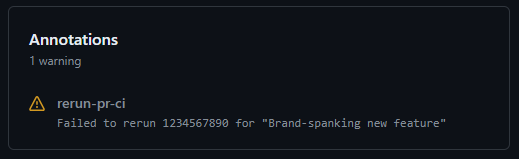
A sanity test of the bash script:
$ ./trigger_on_pull_request_base.sh MattTimms/super_secret_project main
Checking PRs on MattTimms/super_secret_project with base main
1234567890 status=in_progress
✓ Request to cancel workflow 1234567890 submitted.
... Cancelled
✓ Requested rerun of run 1234567890
... Rerunning
What should you change?
- Fixed sleep after cancelling workflow. There’s a race condition between cancelling a workflow run & being able to rerun it. I’ve used a fixed 60s sleep. GitHub will wait 5min for a job to cancel before its server uses force (docs). You could poll GitHub API for the workflow runs status before continuing. The more complex we get, the more I wish to move away from bash. 60s met my requirements.
- I’m only triggering pull-request workflows for wish
baseofmain. Perhaps, you’d like to run on everypushto support pull-requests targeting any branch.
An Update
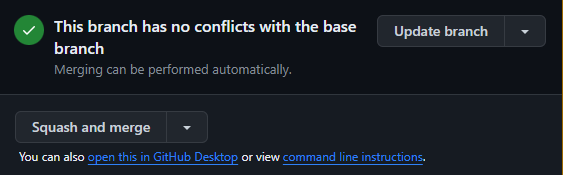
Well, what’s this GitHub? You’ve got a new built-in way to detect these sorts of issues? That’s great! Essentially, this prompt is added below the usual CI checks panel & allows for the option to merge base or rebase head. Since these actions create new commits, new CI checks are run.
In all honesty, that’s enough to signal to reviewers that action is needed - you probably won’t need the solution I have proposed anymore.