How Depot built their GitHub Actions Runners
I came across Depot’s managed Github Actions Runners today.
I like GitHub Actions. I have experience implementing their self-hosted runners, & integrating actions with AWS. So, my interest was peaked & I couldn’t stop thinking: how do you go about building such a system?
Check out product page & watch this demo first:
Wild guesses
The first thing I noticed was the changes we’d need to make to the GitHub Actions workflow files. See the change to runs-on: depot-ubuntu-22.04? When managing one’s own self-hosted runners, we must register it by providing a name for the runner or the group of runners. That allows you to select them from within your workflow yaml file. Full GitHub docs here. But, we’re not managing the runners when we use Depot.
So, how does my GitHub account associate with these runners? The depot docs discuss installing the Depot GitHub App. This will grant Depot limited access to your GitHub account/organization. Admittedly, I’m not too familiar with the extent of what such an app can do, but I assume a lot of helpful stuff. Namely, responding to webhook events (docs). I’d imagine that you could have this app respond to events from GitHub Actions, i.e. job submission.
Alternatively, there is Github’s Action Runner Controller to support dynamically scaling self-hosted runners using Kubernetes. Again, my experience with Kubernetes is limited but, if I’m not mistaken, you could have the management plane run on a small host machine & have it provision beefier EC2 instances on-demand. That controller could be run on Depot’s AWS account so they eat the costs, or perhaps its requirements are small enough to run on an AWS free-tier instance.
Let’s look at the HackerNews discussions for clues…
We’re using a homegrown orchestration system, as alternatives like autoscaling groups or Kubernetes weren’t fast or secure enough. (src)
Ok, missed that. Understandable. Depot’s main product is a managed solution for faster docker builds (product page) using AWS EC2 for builders & S3 to store caches. The architecture for the BYO-AWS-account solution looks like this: (docs)
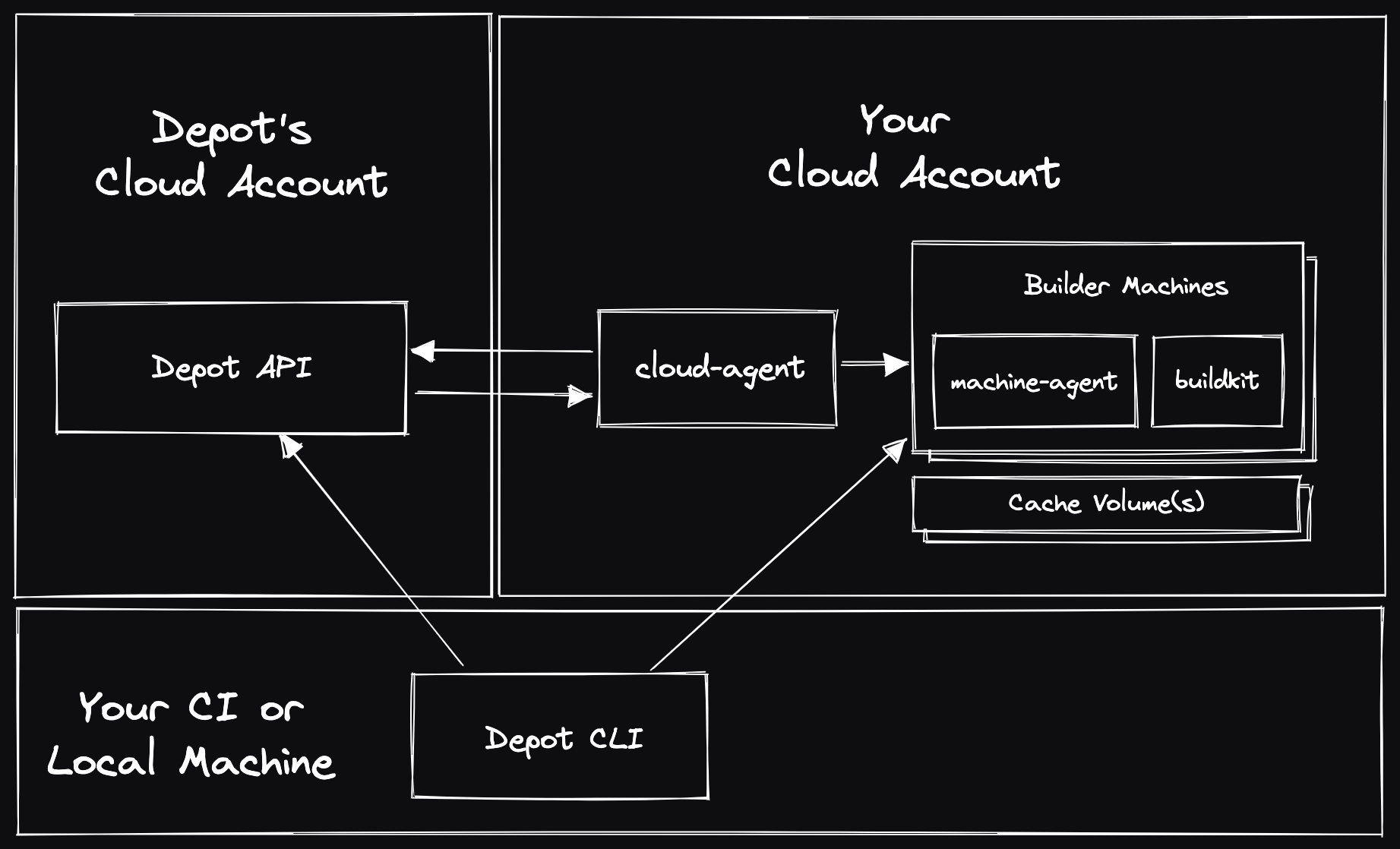
I’ll assume that their newly managed GitHub Actions Runners is built upon the same architecture. Depot’s GitHub App communicates with their API running within their own AWS account. It communicates with a cloud-agent Fargate task which orchestrates the runners within the customer’s AWS account.
Performance
One claim that stuck out to me was:
“Faster job pickup time: Job pickup time is optimized to be sub 5 seconds for most jobs, and sub 10 seconds for the rest.”
That’s fast. Provisioning AWS instances isn’t that fast, in my experience. As an aside, in the demo video, note that a job is submitted but then these some sales pitch given for a while before we check-in on that job. If I was a skeptic checking timestamps, quick maths would say that it took ~14sec for that job to start. But, let’s see how their start up times are explained.
Depot Founder & CTO, Jacob, says:
We’ve effectively gotten very good at starting EC2 instances with a “warm pool” system which allows us to prepare many EC2 instances to run a job, stop them, then resize and start them when an actual job request arrives, to keep job queue times around 5 seconds. (src)
And…
We don’t re-use the VMs - a VM’s lifecycle is basically:
- Launch, prepare basic software, shut down
- A GitHub job request arrives at Depot
- The job is assigned to the stopped VM, which is then started
- The job runs on the VM completes
- The VM is terminated
So the pool exists to speed up the EC2 instance launch time, but the VMs themselves are both single-tenant and single-use. (src)
That’s cool! I didn’t know that could effectively speed up instance start times.
Pricing
Here’s their pricing model, & a comparison table against GitHub’s own costs:
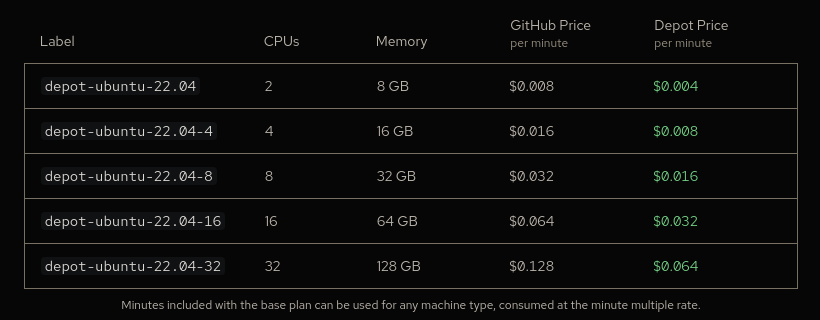
”… we charge on a per-minute basis, tracked per second. We only bill for whole minutes used at the end of the month.”
Sounds like good ol’ AWS’ billing, as expected.
I imagine there are additional costs omitted from these pricing models: any caches stored in S3, the always-on cloud-agent Fargate task, & the brief time spent preparing VMs for future jobs. These costs are probably factored into the Depot price, if not eaten by customers using their own AWS account.
The way the VMs are prepared also interests me. AWS does not charge you for a stopped EC2 instance but does for associated EBS volumes, etc. Having a pool of prepared VMs/instances would have a number of EBS volumes & so a cost incurred for their idle existence. Alternatively, you could take a snapshot of the EBS volume, store it S3, delete the EBS volume, & recreate it on demand. I imagine the EBS volume’s contents at that stage are pretty generic too, akin to an AMI. But is that fast enough? Let’s check if anyone’s asked Jacob:
On achieving fast startup times, it’s a challenge. :) The main slowdown that prevents a <5s kernel boot is actually EBS lazy-loading the AMI from S3 on launch.
To address that at the moment, we do keep a pool of instances that boot once, load their volume contents, then shutdown until they’re needed for a job. That works, at the cost of extra complexity and extra money - we’re experimenting some with more exotic solutions now though like netbooting the AMI. That’ll be a nice blog post someday I think. (src)
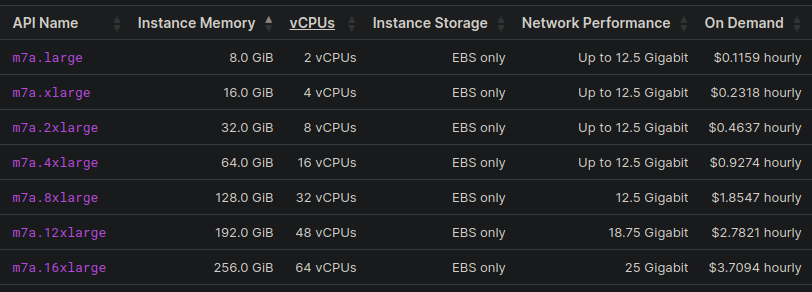
Okay, let’s compare the Depot price to AWS’ instance prices. Depot states they use the m7a.large to m7a.16xlarge instances, offering up to 12.5 Gbps network performance & 9000 IOPS local disk performance, & located in the us-east-1 region.
Here are the hourly prices for those instance types from AWS:
Quick maths:
- AWS’
m7a.large(2vCPUs 8GB) costs $0.1159/hr - Depot’s
depot-ubuntu-22.04(2CPUs 8GB) costs $0.004/minute (or $0.24/hr) - Depot’s gross profit: $0.1241/hr (or 51.71% of service price)
- Still cheaper, faster than GitHub’s pricing
There are still other miscellaneous costs for these goods that I’ve alluded to: S3, EBS, Depot’s API hosting, etc. They still need to feed those developers after all.